Independent softwareProjects / 20262026

Ideas
take shape.

The ralleur mark: eight coloured geometric elements within a fine circle.
Fig. 00ralleur

Something about an app annoys me.
I can’t find a better option. So I start building.

See the projects (01–03)
Three projects. hauser and kurtz are in public beta.Scroll to explore

Projects (03)

02Video / Local dataPublic Beta
kurtzMac
Public beta
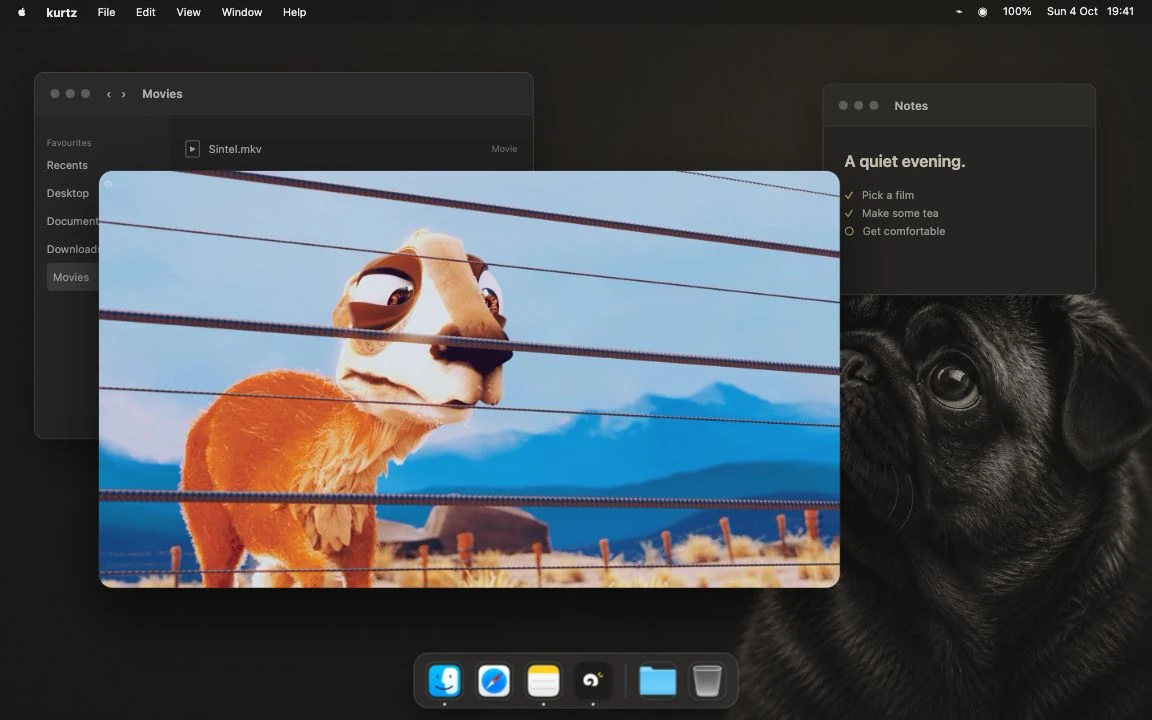
The current kurtz Mac beta playing Caminandes on a staged desktop.kurtz Mac beta · Real app captureView

Local video.
Jellyfin included.

The Mac beta plays local files and your Jellyfin library. I’m now expanding it to manage more of your data with existing open-source tools and local AI.

03Character / WebOpen source
KurtWebsite companion
v0.2.0
Kurt, the small fawn pug, looking up with his curled tail and paws on the line.

A pug for
your website.

The dog wandering around this page now has his own project: the drawings, the animations and a small component you can add to your website.

Download Kurt

All three projects are open source. Downloads, setup and requirements are linked in each project.

More than
a video player.

Mutti is the server counterpart to kurtz, built on Jellyfin. It handles setup, libraries and device access on your Mac or NAS. kurtz is the native client you use to browse, play and work with that content.

The expansion brings more open-source backends and local AI to Mutti, with one interface in kurtz. Easier to set up and use together, on hardware you control.

Planned componentsRunning locally
Your Mac or NAS
MuttiServer · Setup, access & services
Paired connection
kurtzClient · Mac, iPhone & iPad
01 / Local files

Mutti keeps and organises the library on your hardware. kurtz is the client you use to access it.

Mutti and the expanded client are in development. The current public kurtz beta is a video player.

The parts
usually exist.

I don’t need to reinvent them. I want to put existing tools together so they’re less of a pain to use and as easy to set up as possible. That’s it.

Project 01 / hauser

hauser

Public Beta

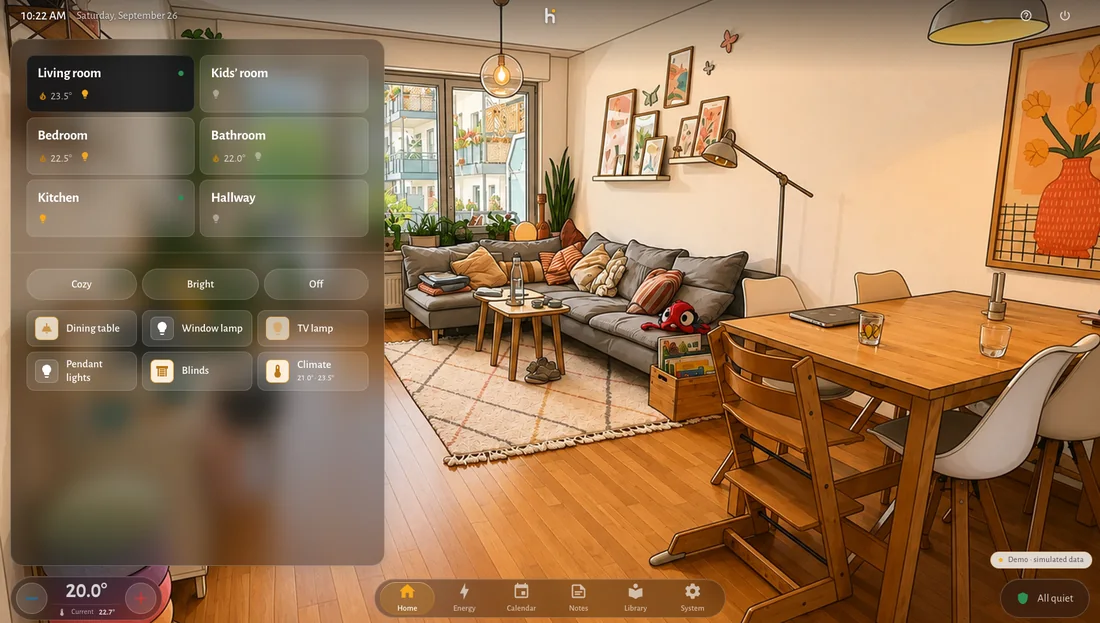
Control lights and scenes by room, through Apple Home or Home Assistant.

Day: hauser’s living-room illustration in natural daylight.
01 / Daylight

Three actual room illustrations from hauser. This study changes images; it does not control a connected home.

Room images

Use the included illustrations, upload a picture, or create images based on your own room. Prepared images change with the time of day and the room’s lighting state.

Connections

Use Apple Home directly in the native iPhone and iPad app, or connect a self-hosted hauser installation to Home Assistant.

Open sourceWeb · iPhone · iPadPublic beta

The demo uses simulated devices. Beta availability and installation requirements are listed on the project website.

Project 02 / kurtz

kurtz

Public Beta

Local video and Jellyfin on Mac. Data management and local AI are in development.

The real kurtz player showing Caminandes on a staged Mac desktop.

Real app capture on a staged desktop. Caminandes © Caminandes team / Blender Foundation.

Playback

Open local videos on your Mac or browse your Jellyfin library. Select audio tracks and subtitles, adjust playback speed, and resume local videos where you stopped.

Based on Swiftfin

kurtz is an independent fork of Swiftfin. Free and open source. The Mac beta is available; iPhone, iPad and Apple TV releases are in preparation.

An independent project, not an official or endorsed Jellyfin or Swiftfin app. Check the project website for current system requirements.

Project 03 / Kurt

Kurt

Open source · v0.2.0

An animated pug for your website, inspired by eSheep and Tamagotchi. He walks, runs, jumps, sits and looks around.

One folder.
Two lines of HTML.

Download the website package and copy its kurt/ folder into your site. No framework, account or build step required.

Kurt’s original neutral pose.
<script type="module" src="/kurt/kurt-element.mjs"></script>
<kurt-companion></kurt-companion>

The simple embed

Kurt stays inside his own area, with a pause control and support for reduced motion. No tracking, remote fonts or third-party scripts. The package includes a working example.

Give him more to do

The shared behavior module provides feeding and carrying for custom integrations. On this site, you can give him treats and drag him onto text or images. Those page interactions are separate from the simple embed.

Web code · AGPL-3.0Artwork · CC BY 4.0Personal & commercial use

Originally made for hauser; now a shared project for hauser, Mutti and other websites. Keep the supplied software notices and artwork credit. License details.

Colophon

Credits

ralleur

Version 03 identity. Original logo, wordmark and palette. Inter by Rasmus Andersson, bundled locally under the SIL Open Font License.

hauser

Original product interface and room illustrations from hauser. Asset license.

kurtz & Caminandes

Real kurtz app capture on a staged desktop. Caminandes: Gran Dillama © Caminandes team / Blender Foundation; attribution: (CC) caminandes.com. Screenshot composition shared under CC BY-SA 3.0. Uniformly resized for display. Full production and media credits.

Kurt

Kurt by Ralleur. Original character drawing and animation artwork under CC BY 4.0; animation cels resized and repacked for this page. Shared web code under AGPL-3.0.

The site

No analytics, advertising scripts or remote fonts are included in this site.

Click or press Enter to give Kurt a treat. Drag to pick him up; when released, he falls onto the next text or object below. With a keyboard, use the arrow keys to pick him up and move him, Enter to release him, or Escape to return him. Five treats make him sick; fewer are digested after three active minutes. Click any mess to clean up.